
Your browser’s new tab page is prime real estate that dictates the rhythm of your daily workflow. Transforming this barren, white canvas with breathtaking, high-resolution imagery can set a definitive tone for your entire workday, injecting moments of tranquility or a sudden burst of inspiration precisely when you need it most.
Key Takeaways
- Visual Motivation: A well-chosen, high-resolution wallpaper can significantly impact your mood, reduce cognitive load, and enhance focus throughout the day.
- Provider Variety: iScreen supports seamless integration with top-tier image providers like Unsplash, Pexels, and Pixabay, ensuring a constant stream of fresh, stunning backgrounds.
- Dynamic Switching: Master how to configure auto-rotation intervals to keep your digital workspace visually stimulating without requiring any manual effort.
- Technical Caching: Discover how the sophisticated prefetching cache engine works behind the scenes to guarantee zero-delay image loading on every new tab.
- Theme Customization: Tailor your image feeds to specific categories and themes that resonate with your personal aesthetic or current project goals.
When you open a new tab, you’re usually transitioning between tasks, seeking a moment of clarity, or hunting for a specific resource. This micro-moment is an opportunity to recalibrate. The iScreen New Tab Experience (NTE) leverages this by turning your dashboard into a personalized productivity haven. Instead of being greeted by visual clutter or a stark, blinding white screen, you are welcomed by curated visual landscapes. Whether you prefer the serene minimalism of a misty mountain range, the structured geometry of modern architecture, or the vibrant energy of abstract gradients, configuring your wallpaper providers correctly is the first step toward a superior browsing environment.
Before diving into the technical depths of wallpaper customization, ensure you have the latest version of iScreen V3 installed and active on your browser. You should also familiarize yourself with the basic layout of the New Tab Experience (NTE) dashboard and ensure you have an active internet connection to fetch live imagery from external REST APIs.
Why Do High-Quality Wallpapers Matter for Productivity?
High-quality wallpapers matter for productivity because they provide essential visual resting points for your eyes, lower psychological stress, and establish a contextual environment that signals your brain to transition into focused, deep work sessions.
The psychology of workspace design extends far beyond physical desks and ergonomic chairs. In the digital realm, your browser is your primary interface with the world. Staring at a chaotic or uninspiring digital environment can subtly drain your cognitive resources. High-resolution imagery, particularly biophilic design elements such as forests, oceans, and natural light, has been scientifically shown to lower cortisol levels and reduce the physiological symptoms of stress.
Furthermore, a curated wallpaper acts as an anchor. When you configure a specific theme for your work hours—perhaps minimalist geometric patterns—your brain begins to associate that visual stimulus with focused execution. By minimizing visual noise and selecting backgrounds that complement the overall aesthetic of your operating system, you reduce friction. It’s the digital equivalent of clearing your desk before starting a massive project.
How Do You Configure Wallpaper Providers in iScreen?
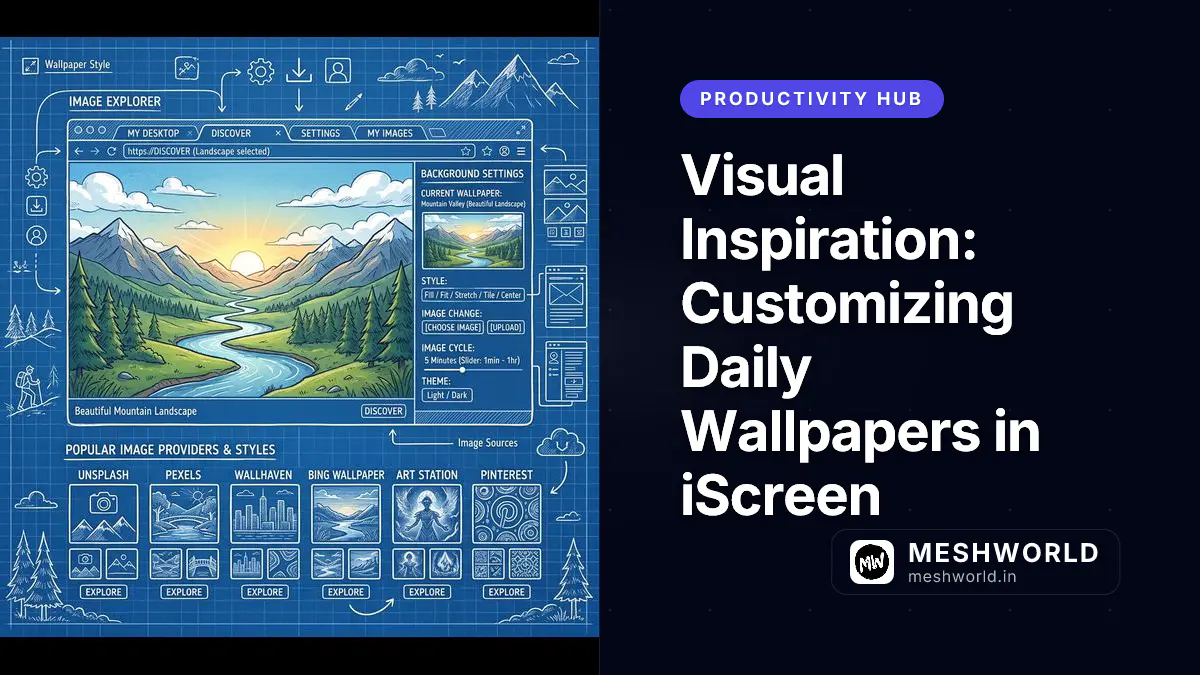
To configure wallpaper providers in iScreen, open the dashboard settings panel, navigate to the Background & Visuals section, and toggle the switches for Unsplash, Pexels, or Pixabay to customize your dynamic background sources.
Configuring these providers involves more than just flipping a switch. By enabling multiple platforms, the extension’s background engine is instructed to query diverse libraries, pulling metadata and high-resolution assets to keep your tabs visually captivating. The setup process is designed to be frictionless, but beneath the surface, it relies on a robust integration with provider APIs.
Step-by-Step Configuration Workflow
- Access the Dashboard Settings: Open a new tab to launch the iScreen dashboard. Click on the gear icon located in the bottom-right or top-right corner (depending on your layout preference) to open the main settings overlay.
- Navigate to Backgrounds: In the sidebar menu, select the Background & Visuals tab. This section governs everything from your wallpaper to your color theme and opacity settings.
- Select Your Providers: Scroll down to the Wallpaper Sources section. Here, you will see toggles for Unsplash, Pexels, and Pixabay. You can enable one, two, or all three.
- Specify Categories (Optional): Beneath the toggles, you will find an input field for keyword filtering. If you only want images of “architecture,” “nature,” or “cyberpunk,” enter those terms here.
- Save and Apply: Click the Apply Changes button. The extension will immediately dispatch a network request to the selected providers to fetch a new background that matches your criteria.
While it might be tempting to select “4K” or “Raw” image quality, sticking to “High” or “1080p” is generally recommended. It provides a crisp visual experience on most monitors while significantly reducing the payload size, ensuring faster downloads and less memory consumption in your browser process.
What Are the Differences Between Unsplash, Pexels, and Pixabay?
The primary differences lie in their curation styles: Unsplash excels in artistic, editorial photography, Pexels focuses on modern, authentic lifestyle imagery, and Pixabay offers a vast, eclectic mix including vectors, illustrations, and highly vibrant photography.
When deciding which providers to activate in your iScreen configuration, understanding the nuanced differences between these platforms can help you curate a highly specific aesthetic. All three platforms offer royalty-free, high-quality images, but their community standards and submission guidelines yield distinct flavors.
Provider Comparison Chart
| Feature | Unsplash | Pexels | Pixabay |
|---|---|---|---|
| Primary Focus | Editorial, artistic, breathtaking landscapes | Authentic lifestyle, modern workspaces, diverse people | Eclectic mix, standard photography, vectors, art |
| Aesthetic Vibe | Moody, cinematic, highly curated | Bright, clean, relatable, corporate-friendly | Highly variable, literal, brightly colored |
| Best For | Inspiration, dramatic backgrounds, nature | Minimalist setups, coding motivation, urban | Specific object searches, abstract vectors |
| API Rate Limits | Strict (requires careful caching) | Moderate | Generous |
| Image Resolution | Exceptionally high (often 4K+) | High (1080p to 4K) | Variable, generally good |
By mixing Unsplash for dramatic landscapes and Pexels for clean, minimalist workspaces, you can achieve a highly balanced and visually stimulating rotation that never feels repetitive. Understanding how these layouts and assets come together is akin to mastering modern web design principles. If you’re interested in the underlying structure of modern interfaces, you might want to read our guide on CSS Grid vs Flexbox.
How Can You Set Up Dynamic Wallpaper Rotation?
You can set up dynamic wallpaper rotation in iScreen settings by configuring the rotation interval to trigger on a new tab, hourly, or daily basis, which prompts the background manager to fetch a fresh asset.
Staring at the same image for weeks can lead to visual fatigue, where the wallpaper essentially becomes invisible to your brain. Dynamic rotation solves this by introducing novelty at controlled intervals. The background manager within iScreen utilizes a cron-like scheduling system tied to your browser’s internal clock and tab events.
Choosing the Right Interval
- Every New Tab: This setting fetches a new image every single time you open a tab. While it offers maximum novelty, it can be distracting if you open tabs frequently and consumes the most bandwidth.
- Hourly: A highly recommended setting. It provides a fresh visual anchor for different phases of your workday—a sunrise scene in the morning, a bright workspace at noon, and a calming gradient in the evening.
- Daily: Perfect for those who want consistency. Your wallpaper becomes the “theme of the day,” providing a stable environment without constant shifts.
To configure this, navigate back to the Background & Visuals settings. Under the Rotation Strategy dropdown, select your preferred interval. The underlying TypeScript engine handles the rest, ensuring that network requests are batched and executed optimally to avoid interrupting your workflow.
How Does the Prefetching Cache Engine Work?
The prefetching cache engine works by proactively downloading the next scheduled wallpaper in the background and storing it in local browser storage, ensuring that the image renders instantaneously with zero network latency when you open a new tab.
One of the most frustrating experiences in custom new tab extensions is the “flash of unstyled content” (FOUC) or the slow, jagged loading of a massive 5MB image. iScreen completely eliminates this issue through a highly sophisticated, multi-layered prefetching cache engine.
Deep Dive into Prefetching Mechanics
When you set your wallpaper rotation to “Hourly,” the extension doesn’t wait until the hour strikes to begin fetching the image. Instead, the engine employs a “Look-Ahead” strategy.
- Background Service Worker Execution: Approximately 10 minutes before the scheduled rotation, the iScreen background service worker wakes up.
- API Invocation: It constructs a query based on your selected providers and keyword categories (e.g., Unsplash + “Minimalist”).
- Data Retrieval and Decoding: The service worker fetches the image blob. Crucially, it doesn’t just save the URL; it downloads the actual image data.
- Base64 Conversion and IndexedDB Storage: The image is processed, compressed if necessary, and stored securely within the browser’s IndexedDB or local storage cache.
- Instant Rendering: When the hour turns and you open a new tab, the UI component instantly retrieves the Base64 string from the local cache. Because the data is already on your disk, the rendering time is measured in milliseconds, bypassing the network entirely.
While the prefetching cache ensures blazing-fast load times, storing multiple high-resolution images locally can consume disk space. iScreen automatically implements a garbage collection routine that purges old, unused wallpapers from the cache to keep the extension footprint under 50MB.
This engine is what makes iScreen feel like a native part of your operating system rather than a clunky web app. It respects your bandwidth by downloading assets quietly in the background and guarantees a premium, uninterrupted visual experience.
What Are the Best Themes for Maximum Productivity?
The best wallpaper themes for browser productivity are nature landscapes, minimalist architecture, and abstract gradients, which minimize distractions while keeping your mind calm and focused during deep work sessions.
While setting your wallpaper to a chaotic collage of your favorite movie characters might seem fun, it is highly detrimental to focus. The human visual cortex is wired to detect patterns and faces; presenting it with a complex image triggers subconscious processing that subtly drains your attention.
Curated Categories to Try
- Biophilic Nature (Forests, Oceans, Mountains): As mentioned earlier, nature scenes reduce stress. Use keywords like
misty forest,calm ocean, ormountain peak. - Minimalist Architecture: The clean lines and structured geometry of modern architecture provide a sense of order and logic, perfect for coding or data analysis. Use keywords like
brutalism,modern interior, orgeometric architecture. - Abstract Gradients and Textures: If you want absolute zero distraction, soft gradients are ideal. They provide a splash of color without any recognizable forms. Use keywords like
dark gradient,soft texture, orglassmorphism. - Space and Astronomy: Deep space imagery offers a dark, soothing palette that pairs exceptionally well with dark mode themes, reducing eye strain during late-night programming sessions. Use keywords like
nebula,deep space, ornight sky.
For the most cohesive experience, ensure your wallpaper aligns with your operating system’s theme. If you run macOS or Windows in Dark Mode, configure your iScreen search queries to include the word “dark” (e.g., “dark minimalist”) to prevent jarring transitions when opening a new tab.
By leveraging the power of Unsplash, Pexels, and Pixabay, combined with iScreen’s intelligent rotation and prefetching engine, you can construct a digital environment that actively supports your mental clarity and workflow efficiency.
Summary
- Visual Motivation: A carefully curated wallpaper strategy drastically reduces cognitive fatigue and sets a positive tone for your deep work sessions.
- Provider Variety: Integrating Unsplash, Pexels, and Pixabay provides a virtually infinite, diverse library of high-resolution, royalty-free assets.
- Advanced Prefetching: The proactive background caching engine guarantees zero-delay, instant rendering of new wallpapers without relying on real-time network speeds.
- Dynamic Rotation: Utilizing hourly or daily rotation schedules introduces necessary visual novelty while maintaining an undisturbed environment.
- Strategic Theming: Selecting minimalist, nature, or abstract categories ensures your dashboard remains an anchor for focus rather than a source of distraction.
Frequently Asked Questions
Can I upload my own custom wallpapers to iScreen?
Yes, you can absolutely upload your own custom wallpapers. iScreen allows you to upload local image files (JPEG, PNG, WebP) directly from your hard drive or provide direct URLs to web images to set as your permanent or rotating background.
Does fetching high-resolution wallpapers slow down my browser?
No, fetching high-resolution wallpapers does not slow down your browser performance. Thanks to the robust prefetching cache engine, all image downloading happens quietly in the background via the service worker, so your active browsing and new tab rendering remain instantly responsive.
Are the images from providers like Unsplash free to use?
Yes, all images provided by the integrated platforms are completely free to use. Unsplash, Pexels, and Pixabay operate under generous public, non-commercial licenses, making them perfectly legal and free for personal browser enhancement and customization.
How do I stop the wallpaper from rotating if I find one I love?
To lock a specific wallpaper, you can click the ‘Pause Rotation’ icon directly on the dashboard or adjust your rotation settings to ‘Manual’. This freezes the current asset in place until you manually request a new fetch or re-enable the automated schedule.