Finding the perfect visual for your web design, app interface, or content campaign shouldn’t take hours or drain your budget. With the rise of AI generation alongside traditional stock photography and public domain archives, the digital asset landscape has transformed in 2026. This handbook provides a curated directory of 100+ image resources, prompt guides, optimization tips, and workflows to level up your design assets.
Key Takeaways
- Know your licenses: Creative Commons Zero (CC0) allows commercial use without attribution, while Editorial licenses strictly prohibit promotional use.
- AI generators vs. Stock: Use AI (Midjourney, Flux, Stable Diffusion) for unique, custom concept art, and premium stock libraries (Adobe Stock, Shutterstock) for photorealistic people and authentic real-world environments.
- Optimize for web performance: Always convert images to modern formats like WebP or AVIF and compress using tools like Squoosh or TinyPNG to maintain fast LCP times.
- Leverage public domain goldmines: NASA, the Smithsonian, and major museums offer high-resolution, copyright-free historical and scientific images perfect for high-impact designs.
Introduction
1. Why Images Matter in 2026
Visual communication dictates user retention. In 2026, web interfaces rely on micro-interactions and high-impact visual design. An application’s visual layout establishes instant credibility, helping users process information 60,000 times faster than text alone. Sourcing the right assets directly impacts bounce rates, conversion metrics, and visual hierarchy.
2. Stock Photos vs. AI Images vs. Public Domain
Each asset type serves a different purpose:
- Stock Photos: Best for representing real people, authentic physical setups, and general business interactions.
- AI Images: Ideal for bespoke illustrations, abstract concepts, or custom product mockups where no real-world photo exists.
- Public Domain: Unmatched for historical depth, scientific accuracy, and vintage textures that give projects unique personality.
3. Understanding Image Licenses
Using digital media requires strict compliance with copyright laws. Sourcing platforms typically operate under Creative Commons, proprietary free licenses, or royalty-free structures. Always review the license metadata before using assets in commercial builds.
4. Commercial vs. Editorial Use
- Commercial Use: Assets used in ads, sales decks, landing pages, or promotional materials. Requires explicit model and property releases.
- Editorial Use: Assets used for informational purposes, journalism, or education. Cannot be used to promote a product.
5. Royalty-Free vs. Copyright-Free vs. Public Domain
- Royalty-Free: You pay a single license fee to use the image indefinitely without recurring fees per view.
- Copyright-Free: Works where copyright has been waived or is inapplicable.
- Public Domain: Works with expired copyright or direct government designations (like CC0).
Free Stock Image Websites
Here’s the directory of the top 20 free stock portals.
1. Unsplash
- Overview: High-quality, artistic photography contributed by a global community.
- Best for: Clean landing page hero sections and developer blogs.
- Pros: Exceptional aesthetic standards; highly searchable.
- Cons: Overused; many images look recognizable.
- Licensing: Unsplash License (Free commercial use, no attribution).
- Commercial usage: Allowed (except for resale or competing platforms).
- Image quality: High-resolution DSLR/mirrorless captures.
- Search quality: Excellent, supports color filtering and orientation.
- AI integration: Search includes AI visual suggestions.
- Ideal users: UI/UX designers, developers, digital marketers.
2. Pexels
- Overview: Aggregated free photography and video directory.
- Best for: Tech backgrounds and dynamic header videos.
- Pros: Huge collection of high-definition vertical videos.
- Cons: High overlap with other free repositories.
- Licensing: Pexels License (Free commercial use).
- Commercial usage: Allowed.
- Image quality: Solid, crisp resolutions.
- Search quality: Very strong, includes tag suggestions.
- AI integration: Basic search matching.
- Ideal users: Content creators, social media managers.
3. Pixabay
- Overview: Long-running repository of photos, vector art, and illustrations.
- Best for: Finding simple design assets, vector patterns, and graphics.
- Pros: Mix of vectors, photos, and sound assets.
- Cons: Design quality varies; includes ads for paid libraries.
- Licensing: Pixabay License (Free commercial use).
- Commercial usage: Allowed.
- Image quality: Mixed; ranges from professional to amateur.
- Search quality: Broad but requires filtering.
- AI integration: Includes AI search sorting.
- Ideal users: Educators, designers needing quick vector icons.
4. StockSnap.io
- Overview: Curated directory focusing on high-quality, non-staged captures.
- Best for: Modern office workspaces and tech conceptual photos.
- Pros: Updated weekly; robust tag catalog.
- Cons: Library size is smaller than competitors.
- Licensing: CC0 (Public Domain).
- Commercial usage: Unlimited commercial use.
- Image quality: Consistently high.
- Search quality: Good categorizations.
- AI integration: None.
- Ideal users: Startup founders, web builders.
5. Burst
- Overview: Platform created by Shopify to help store owners find business images.
- Best for: E-commerce product mockups and retail blogs.
- Pros: Custom business packs organized by niche (e.g. coffee shop, tech gear).
- Cons: Focused strictly on commercial and business subjects.
- Licensing: CC0 or Burst License (both allow free commercial use).
- Commercial usage: Fully allowed.
- Image quality: Crisp, clean studio photography.
- Search quality: Strong.
- AI integration: None.
- Ideal users: E-commerce shop developers, dropshippers.
6. KaboomPics
- Overview: High-fidelity lifestyle photos run by a single photographer.
- Best for: Home decor, food blogging, and soft lifestyle branding.
- Pros: Color palette breakdown and color-matching search options.
- Cons: Soft, warm aesthetic isn’t suitable for harsh technical topics.
- Licensing: Proprietary free license (commercial allowed, no redistribution).
- Commercial usage: Allowed.
- Image quality: Excellent visual depth.
- Search quality: Good; color palette sorting is standout.
- AI integration: None.
- Ideal users: Lifestyle bloggers, agency visual designers.
7. Picjumbo
- Overview: High-resolution database created by photographer Viktor Hanacek.
- Best for: Travel headers, landscape backdrops, corporate teams.
- Pros: High-quality raw assets.
- Cons: Heavy advertising for premium updates.
- Licensing: Free commercial use.
- Commercial usage: Allowed.
- Image quality: Very high.
- Search quality: Standard keyword indexing.
- AI integration: None.
- Ideal users: Bloggers, digital marketing agencies.
8. Gratisography
- Overview: A platform focused on whimsical, funny, and unique photos.
- Best for: Creative ads that need to stand out from standard stock.
- Pros: High creativity, unusual subjects.
- Cons: Not suitable for traditional corporate or formal projects.
- Licensing: Gratisography License (Free commercial use).
- Commercial usage: Allowed.
- Image quality: High-resolution studio/location shots.
- Search quality: Basic keyword matching.
- AI integration: None.
- Ideal users: Social advertisers, guerrilla marketers.
9. Reshot
- Overview: Dedicated catalog of free SVG icons and vector illustrations.
- Best for: Sourcing UI assets and vector layouts.
- Pros: Completely free vector format downloads (SVG).
- Cons: Limited photo directory.
- Licensing: Reshot License (Commercial use, no attribution).
- Commercial usage: Allowed.
- Image quality: High-quality vector assets.
- Search quality: Clean design-oriented categories.
- AI integration: None.
- Ideal users: App developers, UI designers.
10. Freepik
- Overview: Large provider of vectors, PSD templates, and photos.
- Best for: Sourcing graphic design templates and vector mockups.
- Pros: Massive collection of design templates.
- Cons: Free tier requires strict attribution and has daily limits.
- Licensing: Free with attribution (Premium tier removes attribution).
- Commercial usage: Allowed if attributed.
- Image quality: High-fidelity vector templates.
- Search quality: Excellent filtering options.
- AI integration: Built-in AI generation tools.
- Ideal users: Graphic designers, print creators.
11. Vecteezy
- Overview: Directory of vector elements and illustrations.
- Best for: Basic website icons, patterns, and background grids.
- Pros: Built-in vector editor allows adjustments before downloading.
- Cons: High density of watermarks on search interface.
- Licensing: Free with attribution.
- Commercial usage: Allowed with attribution.
- Image quality: Clean vector files.
- Search quality: Good.
- AI integration: Basic AI vector tools.
- Ideal users: Junior designers, web editors.
12. Rawpixel
- Overview: Vintage design resources, museum art plates, and mockups.
- Best for: High-resolution fine art prints and classic layouts.
- Pros: Unrivaled public domain art collections.
- Cons: Free plan has limits on daily downloads.
- Licensing: Creative Commons Zero or Rawpixel License.
- Commercial usage: Allowed on free assets.
- Image quality: Excellent restoration of old museum scans.
- Search quality: Structured by design theme.
- AI integration: None.
- Ideal users: Art directors, editorial designers.
13. ISO Republic
- Overview: Free high-resolution photos and videos.
- Best for: Clean abstract wallpapers and textures.
- Pros: Curated list, high technical quality.
- Cons: Small catalog.
- Licensing: CC0.
- Commercial usage: Allowed.
- Image quality: Good.
- Search quality: Basic.
- AI integration: None.
- Ideal users: General bloggers.
14. SplitShire
- Overview: Artistic photography database by Daniel Nanescu.
- Best for: Automotive lifestyle and dark textures.
- Pros: High artistic value, unique framing.
- Cons: Moderate search functionality.
- Licensing: Free commercial use.
- Commercial usage: Allowed.
- Image quality: Exceptional lighting.
- Search quality: Basic tag catalog.
- AI integration: None.
- Ideal users: Film editors, luxury brands.
15. Life of Pix
- Overview: Community-driven artistic photography catalog.
- Best for: Creative headers, high-concept portraits.
- Pros: High artistic standards, focus on photography talent.
- Cons: Hard to find standard corporate workspace mockups.
- Licensing: Free commercial use.
- Commercial usage: Allowed.
- Image quality: Stunning.
- Search quality: Good.
- AI integration: None.
- Ideal users: Magazine editors, high-end bloggers.
16. Morguefile
- Overview: Raw, unedited photo assets.
- Best for: Reference images for sketches or details.
- Pros: Unstaged, real-world scenes.
- Cons: Visual quality is often amateurish.
- Licensing: Morguefile License.
- Commercial usage: Allowed with attribution.
- Image quality: Mixed.
- Search quality: Basic.
- AI integration: None.
- Ideal users: Painters, graphic references.
17. FoodiesFeed
- Overview: Specialty site for high-resolution food photography.
- Best for: Food apps, restaurants, dieticians.
- Pros: Colorful, beautifully styled food arrangements.
- Cons: Very specific niche.
- Licensing: CC0.
- Commercial usage: Allowed.
- Image quality: High-definition macro shots.
- Search quality: Organized by culinary categories.
- AI integration: None.
- Ideal users: Food bloggers, restaurant designers.
18. LibreShot
- Overview: Office and tech stock site by Martin Vorel.
- Best for: IT setups, minimalist office backgrounds.
- Pros: Clean lighting, very professional compositions.
- Cons: Catalog is smaller due to single-author updates.
- Licensing: CC0.
- Commercial usage: Allowed.
- Image quality: Sharp.
- Search quality: Good.
- AI integration: None.
- Ideal users: Technical writers, corporate publishers.
19. NegativeSpace
- Overview: High-resolution database prioritizing space for text overlays.
- Best for: Social media posts and blog banners.
- Pros: Clean framing with space for text layouts.
- Cons: Moderate search accuracy.
- Licensing: CC0.
- Commercial usage: Allowed.
- Image quality: Solid.
- Search quality: Standard tagging.
- AI integration: None.
- Ideal users: Graphic designers, social managers.
20. Flickr Creative Commons
- Overview: User-uploaded portal spanning millions of real-world captures.
- Best for: Niche historical locations, real-world travel details.
- Pros: Unmatched variety.
- Cons: Requires checking the license on each image (some restrict commercial use).
- Licensing: Variable (CC-BY, CC0, CC-NC).
- Commercial usage: Depends on the specific photo.
- Image quality: Ranges from high-end DSLR to mobile phone shots.
- Search quality: Powerful keyword engine.
- AI integration: None.
- Ideal users: Researchers, geo-marketers.
Premium Stock Libraries
When you need legal compliance, exclusive content, or specific models, premium stock libraries provide structured licenses and legal protection.
1. Shutterstock
- Pricing: Subscriptions from $29/mo (10 downloads) to enterprise custom contracts.
- Strengths: Unrivaled size of library; high model variety.
- Weaknesses: Standard stock aesthetic can look corporate or artificial.
- Licensing: Standard License (commercial use up to 500,000 runs) and Enhanced License (unlimited print runs).
- Recommendations: Ideal for large scale corporate materials and international design requirements.
2. Adobe Stock
- Pricing: $29/mo (10 assets) to custom team plans.
- Strengths: Works directly within Adobe Creative Cloud applications.
- Weaknesses: Subscription costs add up quickly.
- Licensing: Standard, Extended, and Editorial.
- Recommendations: Best for graphic designers working in Photoshop, Illustrator, and InDesign.
3. Getty Images
- Pricing: Individual asset purchases starting at $150; enterprise plans can run into thousands.
- Strengths: Best editorial news and historical photography database in the world.
- Weaknesses: Pricing makes it inaccessible for small businesses.
- Licensing: Rights-managed (RM) and Royalty-Free.
- Recommendations: Crucial for major media brands and high-end publications.
4. iStock
- Pricing: Subscriptions starting at $40/mo.
- Strengths: Exclusive “Signature” assets not found on other platforms.
- Weaknesses: Navigation can be sluggish.
- Licensing: Standard and Extended.
- Recommendations: Excellent mid-range option for small agencies and SMBs.
5. Envato Elements
- Pricing: Flat $16.50/month for unlimited downloads.
- Strengths: Unlimited downloads of fonts, UI kits, code scripts, stock videos, and photos.
- Weaknesses: Photographic quality is lower than Adobe Stock.
- Licensing: Single commercial license (requires registering the project before use).
- Recommendations: Essential subscription for web developers and video creators.
6. Depositphotos
- Pricing: Subscriptions from $29/mo; frequent deals on credit packages.
- Strengths: Budget-friendly pricing tiers.
- Weaknesses: Heavy volume of generic, low-aesthetic assets.
- Licensing: Standard and Extended.
- Recommendations: Good budget option for content managers.
7. Stocksy
- Pricing: Per-image pricing starting at $15 to $100+.
- Strengths: Unrivaled aesthetic, authentic photography, artist co-op structure.
- Weaknesses: No cheap subscription tiers.
- Licensing: Royalty-Free and Extended.
- Recommendations: Ideal for lifestyle brands, fashion campaigns, and design agencies.
8. 123RF
- Pricing: Credit packs and subscriptions starting at $29/mo.
- Strengths: Flexible plans, fast search.
- Weaknesses: Highly corporate styling on photos.
- Licensing: Standard and Extended.
- Recommendations: Great for quick presentations and documents.
9. Dreamstime
- Pricing: Credit-based plans from $25/mo.
- Strengths: Good historical inventory.
- Weaknesses: Cluttered UI interface.
- Licensing: Standard and RF.
- Recommendations: Solid backup option.
10. Alamy
- Pricing: Per-image licensing starting at $20.
- Strengths: Vast library, unique panoramic captures, editorial catalog.
- Weaknesses: Checkouts can be complex.
- Licensing: Rights-managed, RF.
- Recommendations: Sourcing historic milestones, fine arts, and geographic references.
Public Domain & Government Image Resources
Government-funded aerospace, scientific, and heritage institutions offer millions of high-resolution digital files. These collections are generally free of copyright restrictions.
Science & Space Portals
- NASA: Complete archive of astronaut photography and spacecraft construction. Sourced under government public domain.
- NASA Image of the Day: Curated daily high-impact aerospace records.
- NASA Earth Observatory: High-resolution satellite geology and meteorological captures.
- Astronomy Picture of the Day (APOD): Curated space photos with astronomer annotations.
- ESA (European Space Agency): European aerospace catalog (check specific photo terms for CC licensing).
- Hubble Site: Detailed cosmic deep-field nebula and galaxy imagery.
- James Webb Space Telescope (JWST): Next-gen high-definition infrared captures of early cosmic structures.
- JPL (Jet Propulsion Laboratory): Martian rover records and deep solar system explorer data.
- NOAA: Severe weather, oceanic research, and marine biology photo vaults.
- USGS: Cartography, national park surveys, and geological maps.
- National Park Service: High-resolution landscapes and flora/fauna photo libraries from America’s parks.
Historical & Museum Archives
- Smithsonian Open Access: 4+ million museum artifact photos and 3D scans.
- Library of Congress: Vintage print collections, historical maps, and architecture files.
- National Archives: American historical records, documents, and historical photography.
- Public Domain Review: Curated selection of historical books, prints, and odd art plates.
- Wikimedia Commons: Crowdsourced repository of educational media files.
- Internet Archive: Digitized movies, book scans, and visual software histories.
- CDC Image Library: High-resolution medical microscopy and clinical diagnostics.
- NIH Image Gallery: Laboratory workflows, cellular structures, and scientific research.
- Metropolitan Museum Open Access: Over 400,000 public domain art plates.
- Rijksmuseum Studio: High-resolution Dutch Master paintings (Vermeer, Rembrandt) available for commercial use.
- Art Institute of Chicago: Global masterpieces under open-access designation.
- Cleveland Museum of Art: High-fidelity artifact scans and oil painting galleries.
Wallpapers & Daily Images
For creative mood-boards, high-resolution backdrops, or design references:
- Bing Homepage Images: Daily wildlife and geography photography.
- Windows Spotlight: Landscapes and urban structures curated by Microsoft.
- Google Earth Wallpapers: Stunning abstract views of our planet from space.
- Apple Wallpapers: Minimalist vector themes and color palettes.
- National Geographic: World-class natural journalism photography.
- NASA Daily Images: Curated space-agency photography.
- ESA Weekly Images: Earth and space sciences updates.
Free & Paid AI Image Generators
AI image generation has become a core asset creation channel. Here’s a breakdown of the top tools.
1. Midjourney (v6+)
- Best use cases: Concept art, realistic portraits, and complex editorial layouts.
- Image quality: Exceptional photorealism and lighting rendering.
- Text rendering: Solid (supports mid-length phrases with styling).
- Ease of use: Discord interface can be cumbersome; web layout is cleaner.
- Pricing: $10/mo to $120/mo.
- Commercial rights: Yes, for paid plans.
- Strengths & limitations: Best aesthetic output; requires subscriptions and has no free tier.
2. Google Gemini
- Best use cases: Quick visual mockups and document illustrations.
- Image quality: Clean, vibrant colors.
- Text rendering: Good.
- Ease of use: Very simple conversational prompts.
- Pricing: Free tier; Advanced plans are $20/month.
- Commercial rights: Yes.
- Strengths & limitations: Seamless Google ecosystem integration; tight safety guardrails.
3. ChatGPT (DALL-E 3)
- Best use cases: Flat illustration styles, logo concepts, and cartoons.
- Image quality: High contrast, slightly cartoonish/saturated default style.
- Text rendering: Strong.
- Ease of use: Excellent conversational chat context.
- Pricing: Free tier, Plus at $20/month.
- Commercial rights: Yes.
- Strengths & limitations: Best prompt adherence; struggles with absolute photorealism.
4. Adobe Firefly
- Best use cases: Safe corporate design materials, patterns, vector fills.
- Image quality: Very clean, professional standard.
- Text rendering: Moderate.
- Ease of use: High; includes UI dials for style parameters.
- Pricing: Included with Creative Cloud or standalone credit plans.
- Commercial rights: Yes, comes with legal indemnity.
- Strengths & limitations: Legally safe; can feel less creatively experimental.
5. Ideogram
- Best use cases: Posters, typography layout designs, and t-shirt vector files.
- Image quality: Good.
- Text rendering: Market leader in rendering text without typos.
- Ease of use: Simple web app.
- Pricing: Free tier, paid plans from $8/mo.
- Commercial rights: Yes, on paid plans.
- Strengths & limitations: Best letter and spelling rendering; photographic quality is moderate.
6. Leonardo AI
- Best use cases: Game asset creation, UI textures, and 3D rendering design.
- Image quality: Highly stylized; excellent for game design.
- Text rendering: Good.
- Ease of use: Complex; many styling knobs.
- Pricing: Daily free tokens, subscriptions from $10/mo.
- Commercial rights: Yes.
- Strengths & limitations: Granular prompt control; interface is cluttered.
7. Flux
- Best use cases: High-end text layouts, realistic human anatomy.
- Image quality: Exceptional photorealism and hand-anatomy rendering.
- Text rendering: Incredible.
- Ease of use: Requires terminal/UI wrapper or web host API.
- Pricing: Free for open-source local use.
- Commercial rights: Yes (Pro/commercial licenses).
- Strengths & limitations: Top open-source model; requires heavy local hardware.
8. Stable Diffusion (SDXL / SD3)
- Best use cases: Local generation, fine-tuning custom models, workflow pipelines.
- Image quality: Highly variable depending on selected checkpoints.
- Text rendering: Good in v3; poor in SDXL.
- Ease of use: Technical; steep learning curve.
- Pricing: Free to run locally.
- Commercial rights: Under specific commercial licenses.
- Strengths & limitations: Absolute control over generation parameters; complex to set up.
9. Playground AI
- Best use cases: Canvas editing, collage generation.
- Image quality: Good.
- Text rendering: Moderate.
- Ease of use: Clean canvas UI.
- Pricing: Free tier, paid plans from $12/mo.
- Commercial rights: Yes.
- Strengths & limitations: Great web editor; moderate model options.
10. Canva Magic Media
- Best use cases: Quick presentation graphics, social media posts.
- Image quality: Good for web templates.
- Text rendering: Standard.
- Ease of use: Simple integration inside Canva.
- Pricing: Part of Canva Pro ($12.99/mo).
- Commercial rights: Yes.
- Strengths & limitations: Built-in workflow; lacks advanced prompt parameters.
11. Grok (xAI)
- Best use cases: Raw conceptual ideation.
- Image quality: Highly creative and realistic.
- Text rendering: Good.
- Ease of use: Integrated with X.
- Pricing: Included with X Premium.
- Commercial rights: Yes.
- Strengths & limitations: Loose filters allow extreme creativity; X-platform dependency.
12. DreamStudio
- Best use cases: Official Stable Diffusion web generation.
- Image quality: Sharp, customizable.
- Text rendering: Standard.
- Ease of use: Simple.
- Pricing: Credit-based.
- Commercial rights: Yes.
- Strengths & limitations: Fast; interface is simple.
13. Recraft
- Best use cases: Vector icon sets, brand style guides, clean app illustrations.
- Image quality: Crisp vectors, clean color harmonies.
- Text rendering: Excellent.
- Ease of use: High design canvas workflow.
- Pricing: Free tier, paid plans from $10/mo.
- Commercial rights: Yes.
- Strengths & limitations: Outputs infinite-scale vector SVGs; photographic quality is secondary.
AI Image Editing
AI editing tools let you modify specific parts of an image rather than relying on global sliders.
Core AI Editing Actions
- Object Removal: Deleting specific items (like photobombers) without leaving artifacts.
- Background Removal: Isolating products from noisy backgrounds.
- Inpainting: Erasing an area and writing a text prompt to replace that specific section.
- Outpainting / Image Expansion: Extending the canvas of an image to fit widescreen layouts.
- Style Transfer: Applying the visual texture of one design to another.
- Color Replacement: Changing color tags on specific visual objects.
- Relighting: Altering the direction and color temperature of light sources.
- Face Restoration: Sharpening blurred facial structures in low-res photos.
- AI Enhancement: Automatically upscaling micro-details and textures.
Recommended AI Editing Tools
- ChatGPT (DALL-E 3 Canvas): Excellent for basic conversational inpainting and outpainting edits.
- Adobe Firefly Generative Fill: Professional standard for inpainting and canvas extensions.
- Canva Edit Photo: Quick web-based tools for background removal and magic expansion.
- Clipdrop: Great for visual relighting and object removal.
- Photoroom: Sourcing e-commerce background replacements.
- Remove.bg: Single-click background removal.
- Topaz Photo AI: Unrivaled desk application for denosing and facial sharpening.
- Magnific AI: Premium detail injector for high-fidelity images.
Image Upscaling
Upscaling converts lower-resolution generated art into assets ready for print or crisp retina displays.
- Topaz Gigapixel AI: Pro desktop standard. Uses deep learning to inject sharp textures into low-res assets.
- Magnific AI: Premium AI upscaler that acts as a detail-enhancer, reimagining missing pixels.
- Upscayl: Free, open-source local application. Runs entirely on your GPU without subscription costs.
- Waifu2x: Traditional lightweight upscaler, excellent for flat drawings and vector lines.
- Real-ESRGAN: CLI command-line utility for upscaling bulk assets quickly.
Compression & Optimization
Heavy images drag down web performance, hurting SEO and conversion.
Sizing and Formatting Comparisons
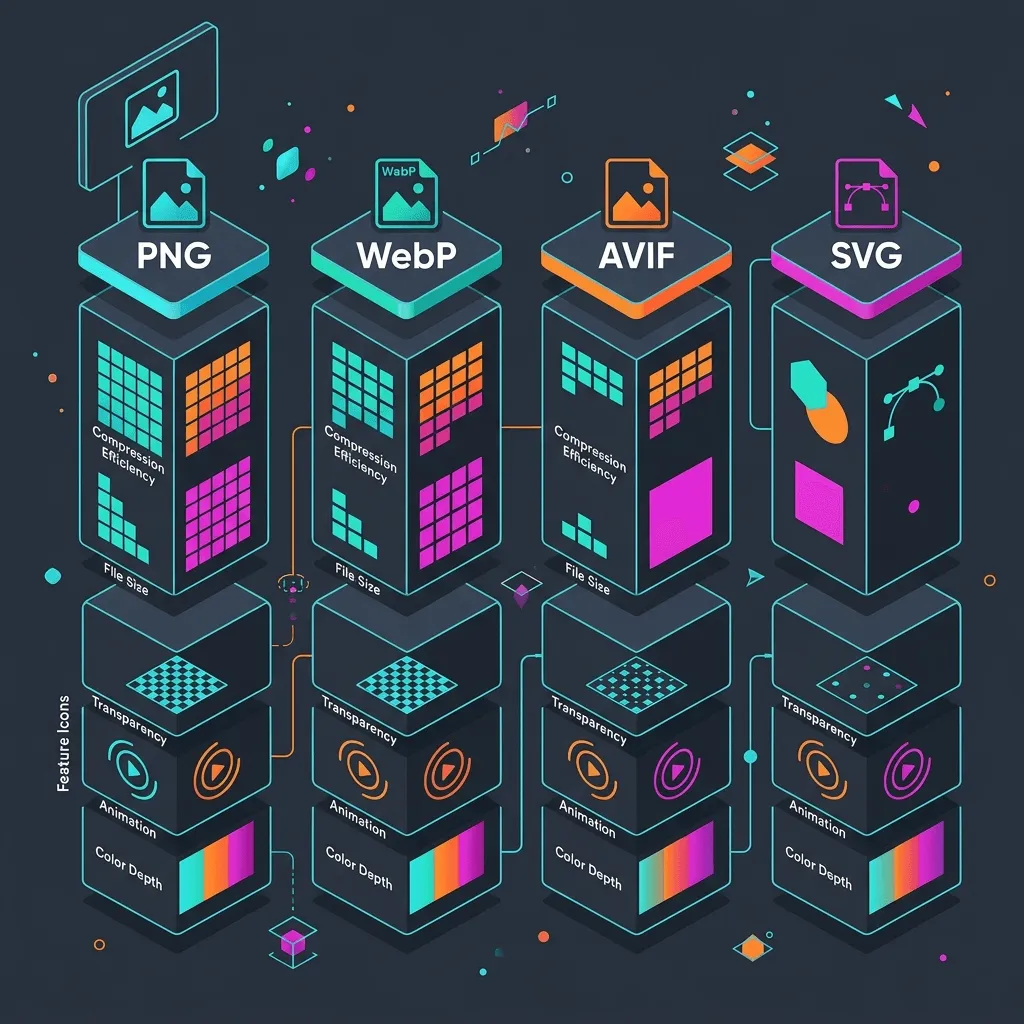
- JPEG: Legacy format best for photography fallbacks.
- PNG: Lossless format for graphics needing transparency; large file sizes.
- WebP: Highly compressed modern format supported by all browsers in 2026.
- AVIF: Next-generation format providing roughly 30% better compression than WebP.
- SVG: Scalable vector format. Perfect for logos and icons.
- JPEG XL: Next-gen photographic compression standard.
Top Compression Utilities
- TinyPNG: Web tool and API for lossy compression of PNG/JPEG files.
- Squoosh: Google’s web app that compares encoders (AVIF, WebP) in real-time.
- ImageOptim: Mac app for stripping EXIF metadata.
- Caesium: Free open-source bulk image compressor.
- RIOT (Radical Image Optimization Tool): Fast Windows utility for fine-tuning compression parameters.
Icons & Illustrations
Sourcing cohesive vector systems is critical for UI design.
Cohesive Vector Icons
- Flaticon: Massive database of user-submitted icon sets.
- Icons8: Standardized, professional icon packs in 40+ designer styles.
- Heroicons: Clean SVGs crafted for Tailwind CSS builds.
- Lucide: Modern, lightweight developer-first icons.
- Font Awesome: Comprehensive commercial library.
- Material Symbols: Customizable symbols by Google.
- Remix Icon: Open-source neutral design icons.
- Phosphor Icons: Consistent icon family in 6 distinct weights.
Vector Illustrations
- unDraw: Minimalist flat SVGs with customizable color sliders.
- Storyset: Web illustrations with built-in exportable animations.
- DrawKit: Hand-drawn sets and 3D graphics packs.
- Humaaans: Interchangeable character designs.
- Open Doodles: Sketchy, freehand illustration templates.
- ManyPixels: Royalty-free vector gallery.
Mockups
Mockups place app designs into realistic device frames.
- Placeit: Web tool for creating product designs.
- Smartmockups: Simple generator for print and device wraps.
- Mockup World: Directory of free layered Photoshop PSD mockups.
- LS Graphics: High-end premium device mockups with clean aesthetic shadows.
- Shots.so: Simple web tool for creating browser wraps and mobile frames.
Reverse Image Search
To verify copyright holders or find higher resolution copies:
- Google Lens: Visual search engine that identifies specific objects and sources.
- Google Images Search: Search via visual uploads.
- Bing Visual Search: Great locator of product stores.
- TinEye: Specialized crawler showing exact copy instances across the web.
- Yandex Images: High-precision face and landmark matching.
Prompt Engineering Masterclass
Creating high-fidelity graphics with AI requires structured prompts.
Anatomy of an Elite Visual Prompt
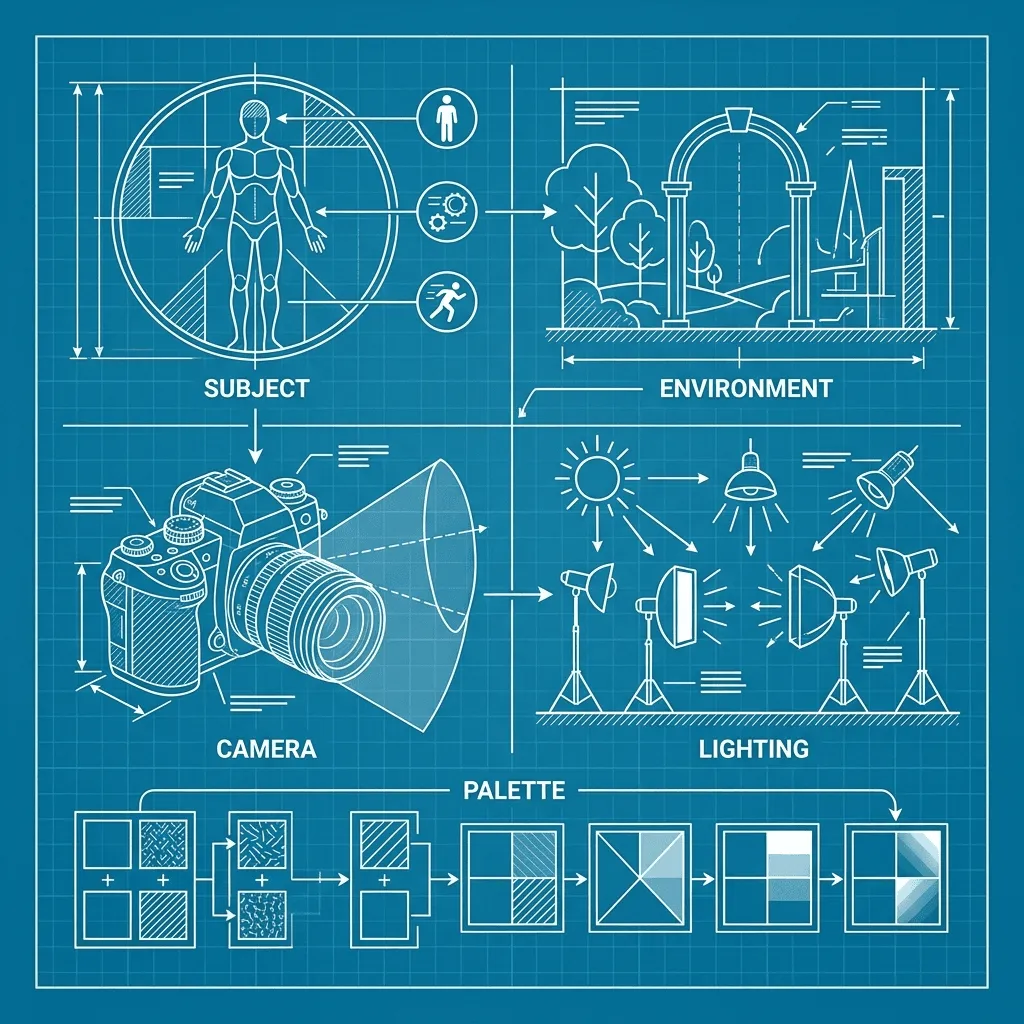
A pro-grade prompt contains up to 7 directives:
- Subject: The primary focus (e.g., “a ceramic coffee mug”).
- Environment / Setting: Background elements (e.g., “on a rustic wooden dining table in a cozy kitchen”).
- Camera Angle: Placement of the camera (e.g., “high-angle shot”, “isometric perspective”).
- Lens / Focus: Depth of field parameters (e.g., “macro lens, f/2.8, shallow depth of field”).
- Lighting: Exposure settings (e.g., “warm morning sunbeam, soft side shadows”).
- Mood: The emotional feel (e.g., “cozy”, “industrial”, “moody”, “serene”).
- Color Palette: Hex values or tones (e.g., “earthy terracotta, sand, and cream tones”).
Key Styling Modifiers & Parameters
To refine your outputs:
- Aspect Ratio (
--ar): Sets width-to-height scaling (e.g.,--ar 16:9for landscape headers,--ar 1:1for profile avatars/icons,--ar 4:5for social posts). - Quality Modifiers: Phrases like “architectural study”, “cinematic photography”, or “vector line art” steer the generation engines better than vague terms like “photorealistic” or “8K”.
- Style References (
--sref): Directs the generator to copy color structures and drawing styles from a URL or template image. - Negative Prompts (
--no): Explicitly lists elements to exclude (e.g.,--no text, watermark, signature, shadows). - Iterative Prompting: The process of adjusting prompts based on early outputs (e.g., shifting “dark background” to “midnight black velvet backdrop” to correct reflections).
100 Ready-to-Use AI Prompts
Here’s a curated library of high-impact visual templates across popular categories.
Product Photography & Mockups
- Prompt 1 (Skincare): A glass dropper bottle of face oil resting on a dry sandstone block, warm harsh sunlight casting soft diagonal shadows, minimal styling, neutral desert color palette. —ar 16:9
- Prompt 2 (Electronics): Sleek wireless headphones resting on a minimal concrete pedestal, dark moody background, blue neon accent light highlighting the metal edges. —ar 16:9
- Prompt 3 (Beverage): A frosted glass bottle of mineral water standing in clear shallow water, ripples, bright sun lighting, sparkling details. —ar 1:1
- Prompt 4 (Food Plating): Gourmet culinary dish of handmade pasta on a matte black plate, microgreens, dramatic overhead studio lighting, wood table. —ar 1:1
UI/UX & Flat Design Mockups
- Prompt 5 (UI Dashboard): Neomorphic glass dashboard UI mockup, clean financial charts, purple-to-blue gradient backdrop, 3D clay-render style devices. —ar 16:9
- Prompt 6 (Flat Tech Vector): Minimalist flat vector illustration of a network server cloud connecting to database nodes, clean flat design, sage green background. —ar 16:9
- Prompt 7 (Isometric UI): Isometric floating browser window displaying a modern landing page mock-up, colorful abstract background, soft dropshadows. —ar 16:9
- Prompt 8 (Mobile App UI): Floating smartphone mockup displaying a minimalist flight-booking app layout, glassmorphic card overlays, clean blue background. —ar 16:9
Corporate, Workspace & Portraits
- Prompt 9 (Home Office): Minimalist modern home office with a walnut desk, a mechanical keyboard, a large display monitor displaying clean code, warm morning sun. —ar 16:9
- Prompt 10 (Meeting): A close-up of hands typing on a laptop during a design meeting, warm office environment, shallow depth of field. —ar 16:9
- Prompt 11 (Candid Portrait): A professional candid headshot of a software developer, soft natural window light, modern tech office background. —ar 1:1
- Prompt 12 (Business Executive): Studio corporate headshot of a business executive, charcoal grey backdrop, Rembrandt spotlighting, professional attire. —ar 1:1
Creative, Fantasy & Art Styles
- Prompt 13 (Watercolor Landscape): Peaceful mountain lake at sunset, soft watercolor wash, delicate charcoal ink outlines, textured paper canvas. —ar 16:9
- Prompt 14 (Cyberpunk Alley): A glowing cyberpunk street alley in Tokyo, neon signs reflecting on wet pavement, purple and cyan color palette, cinematic haze. —ar 16:9
- Prompt 15 (Pixel Art Room): Isometric cozy bedroom with a desktop computer, pixel art style, warm warm lighting, nostalgic retro color palette. —ar 1:1
- Prompt 16 (Oil Painting Portrait): A classical oil portrait of an old astronomer, thick textured impasto brushstrokes, chiaroscuro lighting, dark velvety background. —ar 1:1
- Prompt 17 (Sci-Fi Spaceship Interior): Futuristic starship command bridge, wide terminal consoles displaying data streams, deep space views outside the viewport windows. —ar 16:9
- Prompt 18 (Steampunk Clockwork): Intricate brass clockwork gears and pocketwatch mechanisms, steam rising, warm copper tones, macro lens photography. —ar 1:1
- Prompt 19 (Anime Street): A sunny suburban street in Japan, Ghibli-inspired warm colors, soft watercolor textures, power lines, distant fluffy white clouds. —ar 16:9
- Prompt 20 (Children’s Book): Whimsical illustration of a small rabbit reading a book under a giant glowing mushroom, soft children’s storybook pencil shading. —ar 1:1
- Prompt 21 (3D Render Character): Cute 3D claymation-style character of a developer coding on a laptop, cheerful pastel color palette, soft clean clay textures. —ar 1:1
- Prompt 22 (Flat Infographic): High-precision vector infographic elements showing a clean bar chart, circular percentages, flat design style, teal and tangerine accent colors. —ar 16:9
- Prompt 23 (Logo Icon): Minimalist geometric logo icon of a stylized fox head, clean vector lines, flat solid colors, white background. —ar 1:1
- Prompt 24 (Book Cover): Abstract minimalist book cover design, large geometric shapes, bold typography layout, textured paper overlay, olive green and terracotta palette. —ar 4:5
- Prompt 25 (Wildlife Macro): Extreme close-up photography of a colorful chameleon sitting on a tropical leaf, sharp focus on chameleon’s eye, macro lens, f/2.8, blurry jungle background. —ar 16:9
- Prompt 26 (Architectural Minimal): Concrete brutalist villa in a pine forest, clean lines, large glass panes, overcast grey lighting, architectural photograph. —ar 16:9
- Prompt 27 (Interior Design): Scandinavian minimalist living room setup, light oak floor, cream-colored linen sofa, large potted fiddle-leaf fig plant, soft diffused morning light. —ar 16:9
- Prompt 28 (Historical Sketch): Hand-drawn ink sketch of a medieval castle fortress, faint architectural drafting grid lines, vintage parchment paper background. —ar 16:9
- Prompt 29 (Medical Microscope): Deep scientific view of microscopic cell division, fluorescent glowing cyan and magenta dye highlights, high-resolution lab microscopy. —ar 1:1
- Prompt 30 (Education Infographic): Vector diagram showing the structural anatomy of an atom, flat design, clean lines, educational classroom presentation style. —ar 16:9
- Prompt 31 (Social Media Thumbnail): Dynamic high-contrast thumbnail layout with a floating 3D browser window, glowing gradient background, bold action shapes. —ar 16:9
- Prompt 32 (Poster Layout): Bauhaus design poster, bold geometric layout, clean thick lines, solid primary colors (cream background, cobalt blue, red, yellow). —ar 4:5
- Prompt 33 (Cyberpunk Workspace): Coding desk setup in a futuristic neon hacker den, glowing terminal screens, cable arrays, neon pink and teal illumination. —ar 16:9
- Prompt 34 (Watercolor Botannical): Delicate watercolor illustration of vintage wild roses and leaves, soft paper texture, warm pastel color scheme. —ar 1:1
- Prompt 35 (Abstract Art): Abstract oil painting showing flowing color paths, gold foil embossing details, textured canvas, modern gallery style. —ar 16:9
Copyright & Licensing Deep Dive
Navigating visual rights in 2026 requires understanding these concepts:
- Copyright Basics: The original creator automatically holds the copyright unless they explicitly transfer it or place the asset under CC0.
- Royalty-Free vs. Rights-Managed: Royalty-free allows unlimited use after a one-time fee. Rights-managed restricts use to specific campaigns, formats, or dates.
- Creative Commons Tiers: Standard licensing rules from CC0 (unlimited) to CC-BY-NC-ND (strict limits).
- Model & Property Releases: Any commercial image displaying an identifiable person or private property (like a luxury home or corporate office) requires signed legal releases.
- Trademark Considerations: Sourcing images containing famous brand logos (e.g., Apple, Nike) limits their use to editorial purposes only.
- AI-Generated Content: Pure AI creations cannot currently be registered for copyright. You can use them commercially, but competitors can also use your exact generated output.
- Attribution Best Practices: Include a clean footer credit or caption link:
Image by [Artist Name] via [Source Platform] (CC BY 4.0).
Professional Workflow
To maximize speed and maintain clean, legally compliant assets, follow this ten-step pipeline:
- Define Project Requirements: Determine required resolutions, aspect ratios, and styles.
- Search Free Stock: Check CC0 repositories like Unsplash and Pexels first.
- Check Public Domain Archives: Look for historical, botanical, or scientific assets.
- Generate AI Alternatives: Create custom graphics if stock assets are too generic.
- Verify Licensing: Confirm that model/property releases are present for commercial use.
- Edit and Enhance: Use inpainting, outpainting, or object removal to clean up layout backgrounds.
- Upscale: Run low-res assets through Upscayl or Topaz Gigapixel for crisp displays.
- Compress: Use Squoosh or TinyPNG to convert assets to AVIF/WebP.
- Add Metadata and Alt Text: Add descriptive alt tags to enhance SEO and screen reader accessibility.
- Organize Assets: Save files in structured, version-controlled repository folders.
Best Recommendations by Budget
Free Tiers ($0/month)
Use Unsplash, Pexels, and Pixabay for general layouts. Use Upscayl for offline GPU upscaling, and Squoosh for local web compression.
Under $10/month
Subscribe to Ideogram’s starter plan ($8/mo) for clean typography layout generations, or purchase individual credit packs on Depositphotos.
Under $20/month
A subscription to Envato Elements ($16.50/mo) is the best value. It offers unlimited downloads of templates, mockups, vector art, and stock photography. Alternately, use ChatGPT Plus ($20/mo) for access to DALL-E 3.
Professional Designers ($50 - $100/month)
Combine Midjourney Pro ($30/mo) for high-fidelity custom art with Canva Pro ($12.99/mo) for templates and quick background removals.
Agencies & Enterprise ($200+/month)
Maintain an Adobe Stock Team Plan for integration with design software alongside full legal commercial indemnity.
Education & Non-Profit
Take advantage of Canva for Education (free for eligible teachers/schools) and Smithsonian Open Access to build learning slides and reports.
Frequently Asked Questions
1. What makes CC0 different from CC-BY?
CC0 means the work is placed in the public domain; you can use it without attribution. CC-BY requires you to credit the creator.
2. Can I use AI-generated images on commercial landing pages?
Yes, paid plans from Midjourney, ChatGPT, and Adobe grant full commercial usage rights.
3. What is an editorial-use license?
An editorial license allows usage for news, blogs, and educational purposes. It prohibits promotional use.
4. Which format is better for fast page speeds: WebP or AVIF?
AVIF is superior. It consistently compresses files to smaller sizes than WebP without degrading visual quality.
5. Why are my PNG files so large?
PNG is a lossless format designed for pixel-perfect graphics and transparency. For photography, WebP/AVIF are far more efficient.
6. Can I use celebrity faces in AI-generated art?
No. Doing so violates right-of-publicity laws and can lead to immediate legal action.
7. What is inpainting?
Inpainting is an AI feature that allows you to erase a specific area of an image and replace it using a new text prompt.
8. What is outpainting?
Outpainting extends an image’s borders, automatically generating matching pixels to fill the new canvas dimensions.
9. What is a phantom dependency in vector files?
A vector file that contains reference links to external fonts or raster images rather than embedding them directly.
10. Can I resell images downloaded from Unsplash?
No. Sourcing licenses prohibit reselling images as-is or using them to create competing stock portals.
11. Do I need property releases for public buildings?
Usually no, but private properties, luxury resorts, and architectural icons like the Eiffel Tower (at night) require property releases for commercial ads.
12. What does lossy compression mean?
Lossy compression removes imperceptible visual data to reduce file sizes, whereas lossless compression retains all original data.
13. How does Squoosh differ from TinyPNG?
TinyPNG is an automated compression API. Squoosh is a manual web tool by Google for visually comparing different compression encoders.
14. What are SVG vector assets best for?
Logos, flat icons, UI line art, and simple geometric patterns.
15. Can I use public domain images in commercial projects?
Yes. Public domain works have no copyright restrictions, meaning they can be used freely.
16. What is the recommended aspect ratio for blog covers?
Typically 16:9 (landscape) for desktop layouts, or 1:1 (square) for social platforms like Pinterest.
17. How do I upscale an image without blurring?
Use AI deep-learning upscalers like Topaz Gigapixel or Upscayl, which generate new detail rather than stretching existing pixels.
18. Does Envato Elements include commercial indemnity?
Yes, but you must register each download for a specific project before publishing.
19. What is the benefit of local upscalers like Upscayl?
They run offline on your local computer’s GPU, meaning you don’t pay subscription fees or upload files to external servers.
20. Can trademarked logos appear in stock photos?
Only in editorial stock photos. Commercial stock photos must have logos removed digitally.
21. What is the best camera lens prompt for realistic portraits?
Use prompts specifying portrait focal lengths like “85mm lens, f/1.8 aperture” or “50mm lens”.
22. What is a negative prompt in Midjourney?
A parameter (using --no) that tells the engine what to exclude from the final output.
23. Why does text look scrambled in older AI generators?
Older models process images as pixel groups rather than linguistic symbols. Newer engines (like Flux or Ideogram) have dedicated text-rendering components.
24. What are model releases?
Signed contracts where a model grants permission for their likeness to be used in commercial campaigns.
25. Can I use government website images in books?
Generally yes, US federal government images are public domain, but always check the specific agency’s media policy.
26. Is WebP supported on older browsers?
Yes. WebP has near-universal browser support in 2026.
27. What is JPEG XL?
A next-generation photographic format designed to replace traditional JPEGs, offering high compression ratios and lossless encoding.
28. How does TinEye differ from Google Lens?
Google Lens looks for matching objects and visual categories. TinEye searches for exact duplicate pixel matches of the uploaded file.
29. Can I crop a CC-BY image?
Yes, CC-BY allows modifications, but you must state in your attribution that changes were made.
30. What is the best tool for e-commerce background removal?
Photoroom is the industry leader for automated background extraction and product staging.
Quick Reference Tables
Sourcing & Editing Engine Comparison
| Tool Type | Platform | License Model | Commercial Indemnity | Best For |
|---|---|---|---|---|
| Free Stock | Unsplash | Custom Free | No | High-quality blog covers |
| Premium Stock | Adobe Stock | Royalty-Free | Yes | Corporate advertising |
| Public Domain | Smithsonian | CC0 / Public Domain | No | Historical artwork, scientific assets |
| AI Generator | Midjourney | Subscription RF | No | Concept art, illustrations |
| AI Editor | Adobe Firefly | Credit-Based | Yes | High-safety marketing layouts |
AI Generators At a Glance
| Platform | Best For | Text Rendering | Ease of Use | Cost |
|---|---|---|---|---|
| Midjourney | Photo-realism | Moderate | Moderate (Discord) | Subscription |
| Flux | Detail & Text | Exceptional | Complex (Local) | Free (Open-source) |
| DALL-E 3 | Prompts & Vectors | High | Easy (Chat) | Free / Subscription |
| Ideogram | Typography | Exceptional | Easy (Web) | Free / Subscription |
Graphic Formats Comparison
| Format | Compression | Transparency | Best For | Browser Support |
|---|---|---|---|---|
| AVIF | Lossy/Lossless | Yes | Photography | Modern Browsers |
| WebP | Lossy/Lossless | Yes | General Web | Universal |
| SVG | Lossless (Vector) | Yes | Icons & Logos | Universal |
| PNG | Lossless | Yes | High-detail UI | Universal |
Conclusion
Visual design requires a balance of speed, cost, and legal compliance. Use free stock sites for standard layouts, public domain archives for historical depth, and AI engines for bespoke graphics to scale your visual assets efficiently. Compress every asset to AVIF/WebP and verify license metadata before pushing to production.
What to Read Next
- Accessibility Checklist for Web Designers — Ensure your visual assets are readable for everyone.
- Component Design Systems Principles — Learn how to store and organize visual tokens.