

Source: proton.me/blog/lumo-2
Key Takeaways
- Proton Lumo 2.0 introduces a rebuilt architecture with Lite and Max models, offering up to 240% performance gains over Lumo 1.4.
- The update introduces a dedicated Thinking mode optimized for complex, multi-step logical reasoning tasks.
- Lumo 2.0 is now multimodal, supporting zero-access encrypted image analysis, generation, and editing.
- Live web search with real-time citations has been integrated to retrieve current news, financial data, and weather forecasts.
- Privacy remains core, with all chats, custom assistant configurations, and workspace Projects protected by end-to-end Swiss encryption.
As we explore Proton’s latest private AI system, it is useful to see how this fits into the broader local and private AI ecosystem. In my previous guide, I analyzed What Is OpenClaw? to show how developers can orchestrate fully private, local agents. Lumo 2.0 takes a different path: secure, zero-knowledge cloud hosting.
TL;DR
Proton shipped Lumo 2.0, the biggest update to its privacy-first AI assistant since launch. More than 10 million people have used Lumo over the past year, and this release catches it up to, and in some benchmarks past, the capabilities of mainstream chatbots like ChatGPT, Claude, and Gemini. The headline additions: advanced reasoning, image generation and editing, deep live web search with citations, and long-term memory. Same zero-access encryption. Same European infrastructure. No training on your conversations.
What’s New in Lumo 2.0?
How does the new architecture improve performance?
Lumo 2.0 was rebuilt from the ground up. According to the Artificial Analysis Intelligence Index, an independent benchmark combining 10 evaluations across agents, coding, scientific reasoning, and general knowledge, Proton reports the following gains over Lumo 1.4:
| Model | Index score | Change |
|---|---|---|
| Lumo 1.4 | 15 | - |
| Lumo 2.0 Lite | 34 | +127% |
| Lumo 2.0 Max | 51 | +240% |

Source: Proton
What is the difference between Fast and Thinking modes?
Lumo 2.0 introduces Fast and Thinking modes. Fast prioritizes speed. Thinking is optimized for complex, multi-step reasoning. Thinking mode didn’t exist in Lumo 1.4.
- Everyday queries run up to 76% faster than Lumo 1.4.
- Complex tasks show a visible thinking state so you can follow Lumo’s reasoning in real time.

Source: Proton
How do the new multimodal image capabilities work?
Lumo 2.0 now handles both text and images in the same conversation. You can generate from a text prompt or rough sketch, edit by swapping backgrounds or changing colors, and analyze by uploading a chart, document, screenshot, or photo and asking anything about it.
Zero-access encryption applies to image processing too. The images you upload and the images Lumo generates are stored so that no one, not even Proton, can access them.
Image generation example: 4 logo variants for “Common Ground”

Source: Proton

Source: Proton
Image analysis example: fridge to 3 dinner ideas
“Here’s what’s in my fridge. What can I make for dinner tonight? Give me three options.”

Source: Proton
Is the web search and citation system reliable?
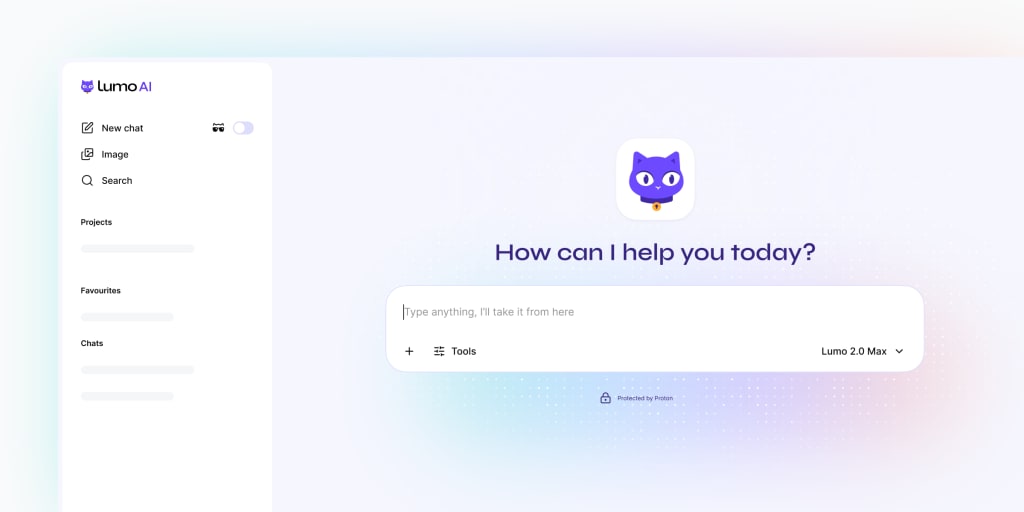
Lumo 2.0’s web search is stronger than 1.4. When a question needs current information, it pulls live results from across the web and cites its sources. Coverage includes recent news and events, live financial data, and weather forecasts. The result is more accurate answers and fewer hallucinations.
Source: Proton
How does user-controlled memory and Projects keep data private?
Lumo 2.0 combines user-controlled memory with Projects so conversations build over time instead of resetting each session. Lumo learns your preferences, working style, and ongoing context. You decide what it retains, what it forgets, what it never learns. The context window is 2x larger, making it better at long conversations, long documents, and big datasets.
Projects are dedicated encrypted workspaces that keep chats, files, and instructions together. Every piece of context is protected by the same zero-access encryption that secures 100M+ Proton Mail and Proton Drive users.

Source: Proton
How can you build custom Lumos?
Build purpose-built assistants tailored to specific tasks. A writing assistant that always drafts in your tone. A research assistant that structures answers the way you want. Define the instructions once; the Custom Lumo follows them every time.
Source: Proton
What Features Does Lumo for Business Offer?
A separate offering aimed at organizations that can’t risk data leaks:
- Zero-access encrypted, never logged, never used for training
- Admin tools for team access management
- Data stays on independent European infrastructure. It is not subject to US Executive Orders or American data collection requests.
Why Is Proton Positioning Lumo 2.0 as a Privacy Alternative?
The framing in the original post is sharper than a typical product update. Proton calls out that people now share more with AI systems than they ever shared with any other technology, and the dominant providers are normalizing a future where your personal data is the price of participation. Conversations are getting mined for training. Behavior is being used as a signal for profiling. Ads are arriving inside the most popular assistants.
The company’s stance is that AI should empower people, not extract from them. Lumo brings Proton’s privacy standards to AI: zero-access encryption, no logs, no data sharing, no training on conversations, and fully open source so anyone can audit the code.
What Are the Lumo 2.0 Pricing Tiers?
| Tier | What you get |
|---|---|
| Free | Core capabilities, sign up at proton.me/lumo |
| Lumo Plus | Unlimited chats, Projects, advanced image generation, priority access to the fastest models |
| Lumo Professional | Premium features for teams; secure collaboration without data-leak risks |
Frequently Asked Questions (FAQ)
Is Lumo 2.0 open source?
Yes. Proton open-sources all Lumo client apps and core specifications so developers and security researchers can audit the code and verify their cryptographic privacy claims.
Does Proton train its models on Lumo conversations?
No. Proton’s zero-access encryption guarantees that your files, prompts, and generated responses are encrypted client-side. Proton and third parties cannot decrypt or access them for model training or any other purpose.
What is the difference between Lumo Lite and Lumo Max?
Lumo Lite is optimized for fast, everyday inquiries with low latency. Lumo Max uses advanced reasoning models in Thinking mode for complex, multi-step operations like research or software coding.
How is the live web search handled privately?
Lumo processes web searches using anonymized search indexes. It retrieves current web content, references, and citations without linking the query history to your personal identity.
Related Articles
Deepen your understanding with these curated continuations.
Deepfake Safety Guide: How to Protect Yourself from AI‑Generated Image Abuse and Where to Get Help
A comprehensive guide on protecting your digital identity from non-consensual synthetic media abuse, containing step-by-step security protocols, platform removal checklists, and immediate legal/support resources.


The Dark Side of AI: Bias, Privacy, and Security Risks
AI promises automation, but it comes with a shadow side. An in-depth security analysis of algorithmic bias, data privacy threats, and security vulnerabilities.

AI vs. AI: The Complete 2026 Guide to Killing Phishing and Scams
Protect yourself from AI-powered scams, voice cloning, and phishing. Learn to use smart tools and defense strategies to secure your identity and money in 2026.


